While using Hosting services, providers often turn on security features to help customers’ websites be more secure and minimize the risk of attacks.One of the most common security features on hosting is the ModSecurity tool, which acts as a website firewall (WAF).
In this article, we will discuss the step-by-step process to enable/disable ModSecurity in your cPanel for enhanced security on your website.
What is ModSecurity?
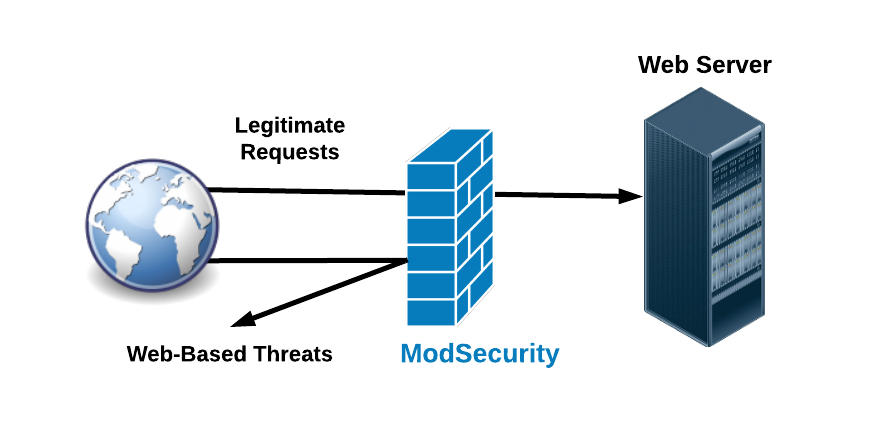
ModSecurity is a web application firewall (WAF). When a request is sent, Mod-security will analyze that request based on the Request header, Request body components to see if these requests are valid or not. Any requested information in each section violates the set rules, it will be up to the configuration to respond accordingly. That is, if your website receives a request that is suspiciously malicious or is trying to attack, Mod-security will block that request if it has predefined rules.
Most hosting services at chennaiwebhosting are equipped with this feature to block basic attacks such as Brute-force, XSS, SQL Injection,…
Normally, ModSecurity will be enabled on your Hosting, but in some cases, you manipulate your website (manipulate too fast or for other reasons), causing Hosting to mistake you as the person trying to invade Hosting. This feature will do your own blocking; the usual error you get is 403 error in this case.
Why you need it
For ecommerce purposes, Mod-security is an essential piece of PCI DSS compliance, helping satisfy Requirement 6.6 by helping shield your site against external threats. Therefore, we strongly advise against disabling or uninstalling the module. Removing the module not only makes your site vulnerable to attacks that would otherwise be blocked, but also compromises your site’s ability to satisfy critical PCI DSS requirements.
Though no security system can responsibly claim perfection, these are some of the most common attacks Mod-security can help prevent:
- SQL injection, a type of attack that attempts to access sensitive information in a database by entering SQL command strings in search boxes, login forms, and sometimes directly into URLs. Successful attacks divulge usernames, passwords, credit card numbers, and can also make other databases in that system vulnerable to such attacks.
- Cross-site scripting (XSS), a form of script injection that forces your website to act as a staging point for attacks on your site’s visitors. If successful, users may unknowingly interact with malicious processes and expose their computers or devices to attack.
- Inclusion vulnerabilities, a type of attack that tricks applications with insecure code into executing the attacker’s malicious code.
- Brute force attacks, a script designed to rapidly guess username and password combinations until the attacker gains access. Some scripts only guess the top 10 or top 100 passwords, while more prolonged attacks use multiple dictionaries and make millions of guesses per second over minutes, hours, or even days.
Function
- ModSecurity employs a variety of methods to protect websites. Here are some of the most common. For more information, visit the Mod-security website.
- Real-time application security monitoring and access control: This focuses on external threat mitigation and includes whitelisting and blacklisting, as well as real-time threat assessment and blocking.
- Full HTTP traffic logging: ModSec keeps detailed logs of all incoming and outgoing traffic, making it an exceptional tool for all investigations.
- Continuous passive security assessment: Instead of monitoring external threats, this feature monitors internal systems for abnormalities and weaknesses in a proactive effort to identify them before they can be exploited.
- Web application hardening: This feature allows administrators to restrict the types of HTTP requests accepted by their website, such as request methods, request headers, and content types, among others.
Should I Use ModSecurity?

Whether or not you should use Mod-security depends on your specific security needs and requirements. Mod-security is an open-source web application firewall (WAF) that can be deployed to enhance the security of web applications by protecting against various attacks, such as SQL injection, cross-site scripting (XSS), and other common web exploits.
Here are some factors to consider when deciding whether to use ModSecurity:
- Security Requirements: If your web application deals with sensitive data or is prone to attacks, using Mod-security can provide an additional layer of defense against common web exploits.
- Compliance: If your organization needs to comply with certain security standards or regulations (such as PCI DSS, HIPAA, or GDPR), deploying ModSecurity may help you meet some of the requirements related to web application security.
- Resource Availability: Consider whether you have the necessary resources (time, expertise, hardware) to deploy and maintain ModSecurity effectively. While it’s open source, it still requires configuration and ongoing management.
- Impact on Performance: ModSecurity can introduce some performance overhead due to the inspection of HTTP requests and responses. Evaluate whether the potential performance impact is acceptable for your application’s requirements.
- Integration with Existing Infrastructure: Assess how well ModSecurity integrates with your existing web server infrastructure (e.g., Apache HTTP Server, NGINX). Ensure compatibility and consider ease of integration.
- Customization and Flexibility: ModSecurity offers a high degree of customization and flexibility, allowing you to create custom rules tailored to your specific application. Evaluate whether this flexibility meets your needs.
- Community and Support: Consider the availability of community support, documentation, and resources for ModSecurity. While it’s widely used and has an active community, ensure that you’ll have access to the support you need.
- Cost: ModSecurity itself is free and open source, but there may be associated costs with deployment, maintenance, and support, depending on your organization’s setup.
Managing ModSecurity
Please follow these steps to manage the ModSecurity module for your account:
Log in to cPanel.
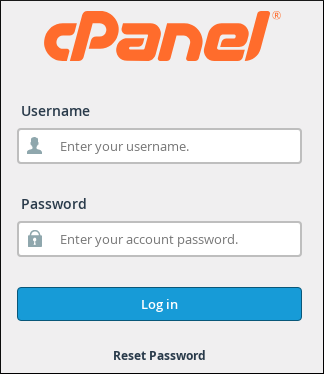
Click ModSecurity in the SECURITY section of the cPanel home screen:

To disable ModSecurity, do one of the following:

-
- To disable ModSecurity for all of your domains, under Configure All Domains, click Disable.
- Alternatively, to disable ModSecurity for a specific domain, under Configure Individual Domains, locate the domain, and then click Off.
To re-enable ModSecurity, do one of the following:
-
- To enable ModSecurity for all of your domains, under Configure All Domains, click Enable.
- Alternatively, to enable ModSecurity for a specific domain, under Configure Individual Domains, locate the domain, and then click On.
Conclusion
Following the steps outlined in this article, you can protect your website from a wide range of web-based attacks. However, it’s important to monitor your ModSecurity logs and keep your rules fully updated to maintain a higher level of security.