Introduction
Databases play a crucial role in the modern world by providing a structured way to store, manage, and retrieve data. They are foundational to various applications, from small-scale projects to large enterprise systems. Here’s a brief overview of what databases are and why they matter.
What is a Database Management System (DBMS)?

A Database Management System (DBMS) is software that enables the creation, management, and manipulation of databases. It acts as an intermediary between users and the database, allowing users to interact with data in a structured and efficient manner.
Key Functions of a DBMS
- Data Storage and Retrieval: DBMS allows users to store large volumes of data and retrieve it efficiently using structured queries.
- Data Manipulation: Users can insert, update, and delete records in the database. This includes managing data integrity and ensuring consistency.
- Data Definition: DBMS provides tools for defining the database structure, including tables, fields, and relationships, often through a Data Definition Language (DDL).
- Data Security: It enforces security measures, including user authentication and access controls, to protect sensitive data.
- Backup and Recovery: DBMS offers mechanisms for data backup and recovery to prevent data loss in case of failures or disasters.
- Data Integrity: It ensures the accuracy and consistency of data through integrity constraints and validation rules.
- Multi-User Access: DBMS supports concurrent access, allowing multiple users to work with the database simultaneously while managing potential conflicts.
Types of DBMS
- Relational DBMS (RDBMS): Organizes data into tables with relationships. Examples include MySQL, PostgreSQL, and Oracle.
- NoSQL DBMS: Designed for unstructured or semi-structured data, allowing for flexible schema. Examples include MongoDB and Cassandra.
- Hierarchical DBMS: Organizes data in a tree-like structure. Example: IBM Information Management System (IMS).
- Network DBMS: Uses a graph structure to represent relationships. Example: Integrated Data Store (IDS).
- Object-oriented DBMS: Stores data in the form of objects, as used in object-oriented programming. Example: db4o.
What Are Databases Used For?
Databases are used for a wide variety of purposes across many sectors. Here are some key applications:
1. Data Storage and Management
- Centralized Storage: Databases provide a centralized location for storing large volumes of data, making it easier to manage and access.
- Data Organization: They help organize data in a structured format, facilitating efficient retrieval and analysis.
2. Business Applications
- Customer Relationship Management (CRM): Storing customer data, interaction history, and sales records to enhance customer service and sales strategies.
- Inventory Management: Tracking stock levels, orders, and supplier information to streamline operations.
3. Financial Systems
- Transaction Processing: Handling banking transactions, credit card processing, and financial reporting.
- Risk Management: Analyzing data for risk assessment and fraud detection.
4. Healthcare
- Patient Records: Storing medical histories, treatment plans, and billing information for patients.
- Research Data: Managing clinical trial data and research findings for analysis.
5. E-commerce
- Product Catalogs: Organizing product information, pricing, and availability for online stores.
- User Accounts: Managing user profiles, order histories, and payment information securely.
6. Web Applications
- Dynamic Content: Supporting websites and applications that require user-generated content, such as blogs and forums.
- User Authentication: Storing login credentials and user preferences.
7. Data Analysis and Reporting
- Business Intelligence: Analyzing data to generate reports, dashboards, and insights for strategic decision-making.
- Data Warehousing: Consolidating data from various sources for comprehensive analysis.
8. Scientific Research
- Experiment Data: Storing and managing research data, experiment results, and findings for various scientific fields.
9. Social Media
- User Interaction: Managing user profiles, posts, comments, and likes to enable social networking features.
10. Education
- Student Information Systems: Keeping track of student records, grades, and course enrollments.
Advantages and Disadvantages of DBMS
Advantages of Database Management Systems (DBMS)
- Data Integrity: DBMS enforces data integrity constraints, ensuring accuracy and consistency in data.
- Data Security: Provides mechanisms for user authentication and authorization, protecting sensitive data from unauthorized access.
- Data Redundancy Control: Reduces data duplication by organizing data into structured tables, minimizing storage costs and inconsistencies.
- Multi-User Support: Allows multiple users to access and manipulate data concurrently, with mechanisms to manage conflicts.
- Data Independence: Changes in data structure can be made without affecting application programs, thanks to abstraction layers.
- Backup and Recovery: DBMS offers tools for automatic data backup and recovery, safeguarding against data loss.
- Efficient Data Access: Optimizes queries for faster data retrieval through indexing and query optimization techniques.
- Data Management: Simplifies data management tasks with built-in tools for reporting, data analysis, and management.
Disadvantages of Database Management Systems (DBMS)
- Complexity: DBMS can be complex to design, implement, and maintain, requiring specialized knowledge and skills.
- Cost: The initial setup and ongoing maintenance of a DBMS can be expensive, particularly for large systems or enterprise solutions.
- Performance Overhead: The added layer of abstraction may introduce performance overhead compared to simpler file-based systems.
- Potential for Data Breaches: Centralized data storage can be a target for cyberattacks, making robust security measures essential.
- Resource Intensive: DBMS can consume significant system resources, including memory and processing power, especially under heavy loads.
- Vendor Lock-In: Organizations may become dependent on a specific DBMS vendor, making it challenging to switch to another system.
- Requires Training: Users and administrators need training to effectively use and manage a DBMS, which can lead to a learning curve.
What are the components of a database?
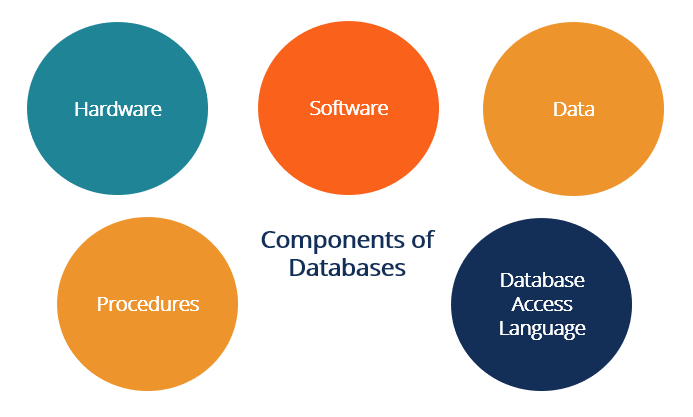
While the different types of databases vary in schema, data structure and data types most suited to them, they are all comprised of the same five basic components.
- Hardware. This is the physical device that database software runs on. Database hardware includes computers, servers and hard drives.
- Software. Database software or application gives users control of the database. Database management system (DBMS) software is used to manage and control databases.
- Data. This is the raw information that the database stores. Database administrators organize the data to make it more meaningful.
- Data access language. This is the programming language that controls the database. The programming language and the DBMS must work together. One of the most common database languages is SQL.
- Procedures. These rules determine how the database works and how it handles the data.