Introduction
In this article, we will learn how to install Laravel on cPanel using Softaculous. Laravel is a powerful web development framework built on the PHP programming language. Developed by Taylor Otwell, Laravel is not only a popular tool in the web development community but is also considered one of the most modern and user-friendly PHP frameworks. With Softaculous, installing Laravel on cPanel will be easy and quick.
What is Laravel?
Laravel is a popular open-source PHP framework designed for building web applications. It provides a clean, elegant syntax and a range of tools and features that streamline the development process. Here are some key aspects of Laravel:
Key Features
- MVC Architecture: Laravel follows the Model-View-Controller (MVC) design pattern, which helps separate the application logic, user interface, and data handling. This separation makes it easier to manage and scale applications.
- Routing: Laravel offers a simple and flexible routing system that allows developers to define routes and handle HTTP requests with ease. This makes it straightforward to manage URL routing and implement custom routes.
- Eloquent ORM: Eloquent is Laravel’s built-in Object-Relational Mapping (ORM) tool. It provides an easy and intuitive way to interact with the database using PHP syntax, eliminating the need for complex SQL queries.
- Blade Templating Engine: Laravel includes Blade, a powerful and flexible templating engine that allows developers to create dynamic and reusable views. Blade makes it easy to manage layouts and templates.
- Artisan Console: Artisan is Laravel’s command-line interface (CLI) that provides a variety of helpful commands for tasks like database migrations, seeding, and scaffolding code. It automates many common development tasks.
- Security: Laravel includes several built-in security features, such as protection against SQL injection, cross-site request forgery (CSRF), and cross-site scripting (XSS). It also provides easy ways to hash passwords and manage user authentication.
- Migration System: Laravel’s migration system allows developers to version-control their database schema changes. This makes it easier to manage database structure changes across different environments.
- Testing: Laravel is designed with testing in mind and includes support for PHPUnit, making it easier to write and run tests to ensure application stability and correctness.
- Task Scheduling: Laravel offers a task scheduling feature that allows developers to schedule periodic tasks using a fluent, expressive syntax. This is useful for automating routine tasks like sending emails or cleaning up logs.
- Queue Management: Laravel includes a unified API for various queue backends, allowing developers to defer the processing of time-consuming tasks, such as sending emails or processing files, to improve application performance.
Ecosystem and Community
- Laravel Ecosystem: Laravel has a rich ecosystem with various tools and packages that extend its functionality. Notable ones include Laravel Forge (server management), Laravel Nova (administration panel), and Laravel Vapor (serverless deployment).
- Community: Laravel has a vibrant and active community. There are many resources available, including documentation, forums, tutorials, and conferences, which contribute to its growth and popularity.
Why Use Laravel?
- Developer-Friendly: Laravel’s elegant syntax and developer-centric tools make it easier to build robust applications quickly.
- Scalability: Laravel’s architecture and features support the development of scalable applications that can handle growing user bases and complex requirements.
- Modern Practices: Laravel incorporates modern development practices and design patterns, making it a suitable choice for contemporary web application development.
Steps to install Laravel on cPanel using Softaculous
Prepare Your Environment
Make sure you have the following prerequisites:
- PHP: Laravel requires PHP 8.0 or higher.
- Composer: Laravel uses Composer for dependency management. Ensure it is installed.
- Database: Have access to a MySQL or similar database.
Step 1: Log in to cPanel
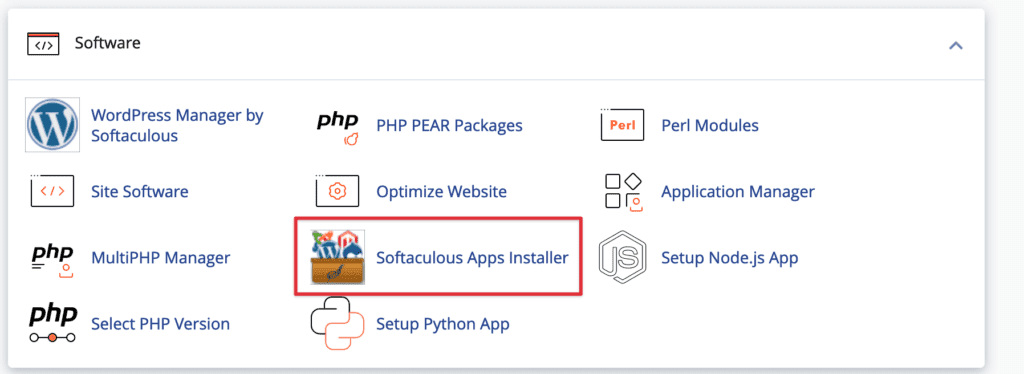
First, log in to your cPanel and look for the Softaculous icon in the “Software” section.
Step 2: Find Laravel in frameworks
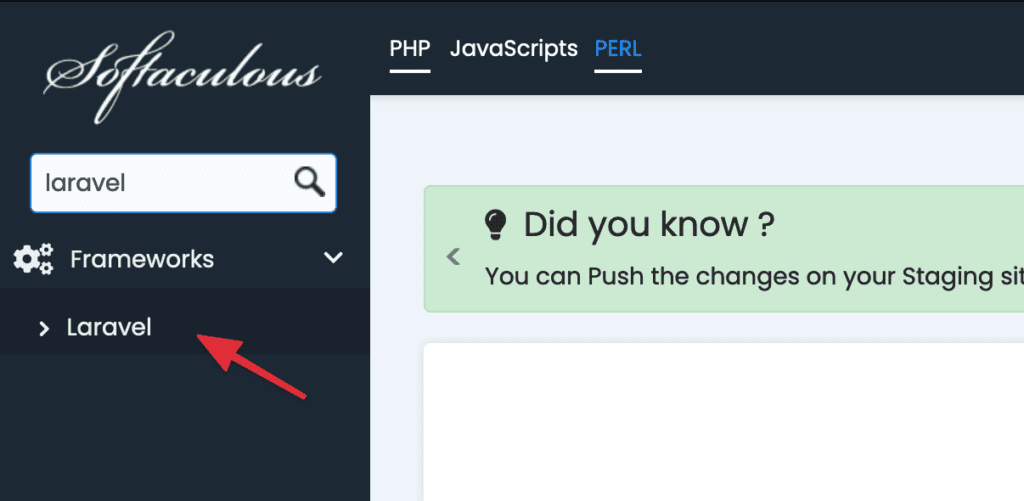
In Softaculous, search for and select the Laravel application as shown below:
Step 3: Install Laravel
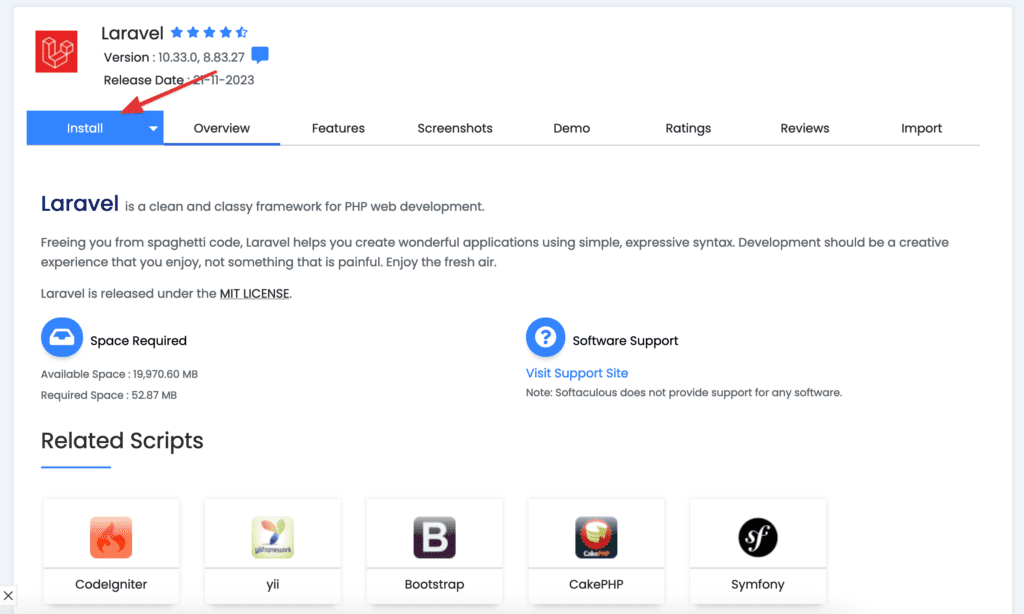
Now, click Install in Laravel to start the installation process.
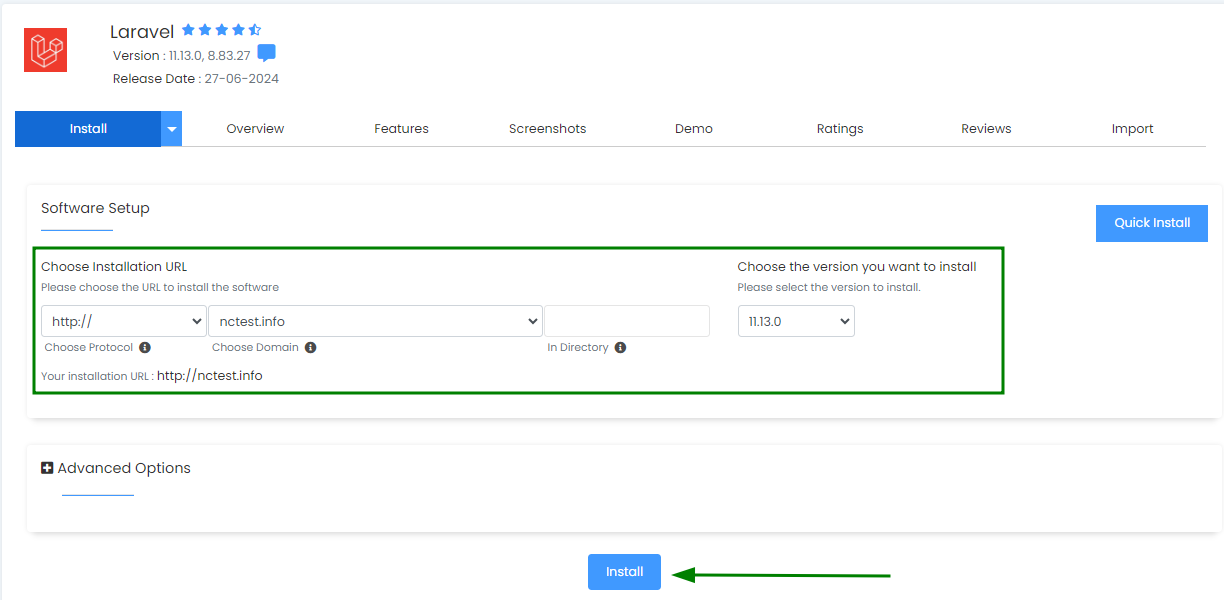
Choose the domain and Laravel version you want to install:
Click the “Install” button and wait for the installation process to complete.
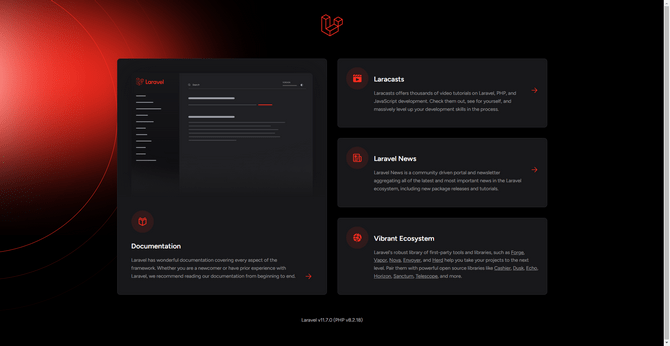
Access your browser with the provided URL:
Conclusion
Hopefully, this guide can help you easily deploy your Laravel application on cPanel and enjoy the benefits of this powerful project management environment. ish you success in developing your application on Laravel.