
Introduction
Reverse DNS (rDNS) is a process that resolves an IP address back to a domain name, the opposite of a forward DNS query.
In this article, you will learn what reverse DNS is and how it works.
What Is Reverse DNS?
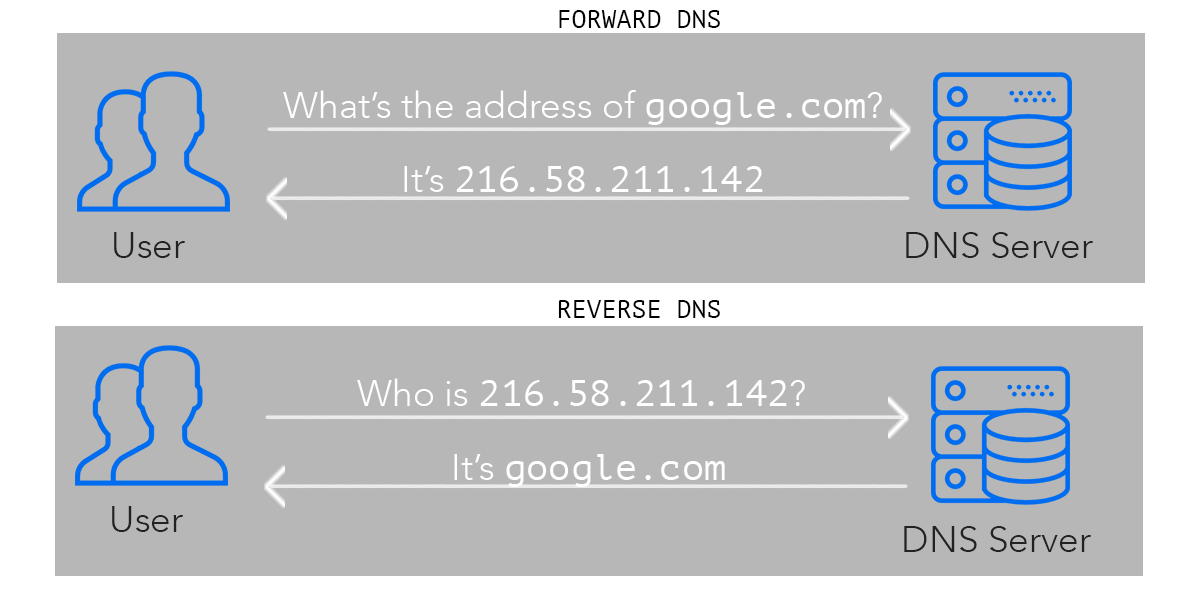
Reverse DNS (Domain Name System) is the process of mapping IP addresses to domain names. In traditional DNS, you input a domain name and receive an IP address as a result. Revers DNS, on the other hand, works in the opposite direction; it takes an IP address and resolves it to a domain name.
Reverse DNS is commonly used for various purposes, including:
- Network troubleshooting: It can help identify the domain associated with an IP address, which can be useful for diagnosing network issues or identifying potentially malicious activity.
- Email authentication: Many email servers use reverse DNS to verify the authenticity of incoming email messages. By checking that the reverse DNS lookup matches the sending domain, email servers can help prevent spam and phishing attacks.
- Logging and auditing: Reverse DNS can be used to log and audit network traffic, providing additional context about the sources of incoming connections or requests.
What Is Reverse DNS Lookup Used For?
Reverse DNS is particularly useful for those running an outgoing mail server. Besides mail servers, there are several reasons for using rDNS:
- Filtering spam emails. Most email servers use rDNS to block spam mail, rejecting messages from IP addresses without rDNS. However, rDNS is mainly used as an additional layer of protection because it isn’t reliable as some legitimate mail servers don’t have properly set up rDNS records.
- Analytics. This helps provide human-readable data in analytics, rather than listing logs of IP addresses.
- Tracking website visitors. IP addresses of website visitors remain in the visit logs and can help you get an idea of your website audience. Tracking website visitors is beneficial for B2B lead generation.
- Smooth network experience. Reverse DNS prevents you from encountering problems with most enterprise management systems, r-commands, SMTP servers, or network backup systems. rDNS is also one of the basic requirements for running some Internet protocols.
- Security. A reverse IP lookup can be used to find the IP address’ A records, mapping a domain name to the physical IP address of the device hosting that domain. The results help determine the virtual hosts served from a web server and identify server vulnerabilities.


Reverse DNS Lookup in Linux
There are two ways for rDNS lookup in Linux:
1. The dig command
Use the dig command in Linux to perform a manual reverse DNS lookup. The syntax is:
<code>dig -x [ip_address]</code>
For example:
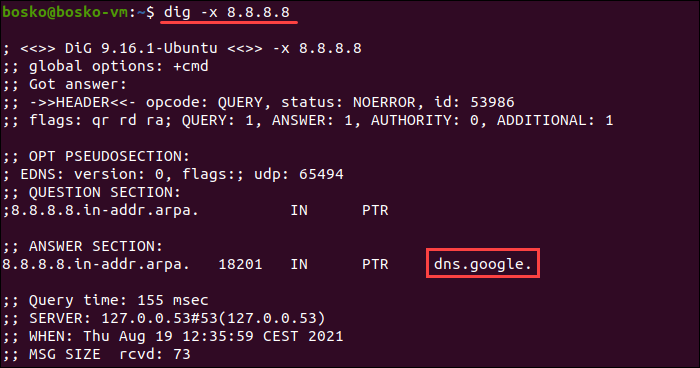
The output displays the domain name for the specified IP address.
Conclusion
You now know what reverse Domain Name System is and how to perform rDNS lookup in Windows, Linux, and using online tools.
Feel free to test the tools, but note that some websites don’t have rDNS set up, and the tools return an error in that case.