
IP address definition
An IP address is a unique address that identifies a device on the internet or a local network. IP stands for “Internet Protocol,” which is the set of rules governing the format of data sent via the internet or local network.
In essence, IP addresses are the identifier that allows information to be sent between devices on a network: they contain location information and make devices accessible for communication. The internet needs a way to differentiate between different computers, routers, and websites. IP addresses provide a way of doing so and form an essential part of how the internet works.
What is an IP Address?

An IP address is a string of numbers separated by periods. IP addresses are expressed as a set of four numbers — an example address might be 192.158.1.38. Each number in the set can range from 0 to 255. So, the full IP addressing range goes from 0.0.0.0 to 255.255.255.255.
IP addresses are not random. They are mathematically produced and allocated by the Internet Assigned Numbers Authority (IANA), a division of the Internet Corporation for Assigned Names and Numbers (ICANN). ICANN is a non-profit organization that was established in the United States in 1998 to help maintain the security of the internet and allow it to be usable by all. Each time anyone registers a domain on the internet, they go through a domain name registrar, who pays a small fee to ICANN to register the domain.
What is the Purpose of an IP Address?
IP addresses help identify computers, routers, Bluetooth devices, and other hardware on a network. These addresses allow the devices to connect to each other and transfer information over a local network or the internet.
How Do IP Addresses Work?

You may often run into minor computer networking issues, or occasionally find that your computer or other device may not connect in the way it’s supposed to. When that happens, a basic understanding of how an IP address works can help you troubleshoot the problem.
Internet Protocol technology works in a way similar to any other protocol. It establishes a common language and set of rules that can be used to exchange information. Here are the steps involved when you send or receive data via the internet:
- Your device connects to a network, which in turn connects your device to the internet. This network is typically your ISP (Internet Service Provider), or your company network if you’re at work.
- The ISP assigns an IP address to your device. When you request data (for instance, open a website or play a video), the request is routed through your ISP using your IP address.
- However, the IP address assigned to your device is not constant. It can change in certain circumstances, such as when you switch your router or modem on or off, or if you contact your ISP and request a change.
The whole process repeats again when you connect to a different network. For example, if you connect to the internet from an airport, the airport’s ISP will give you a new IP address.
Types of IP Addresses
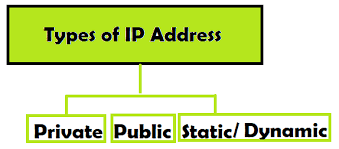
Any person or business with an internet service plan is assigned consumer IP addresses, which can be further divided into two types – Private IP address and Public IP address – depending on the network location.
Private IP Address: A private IP address is used for communication inside the network. All the devices in a network will have their own private IP addresses. These include computers, speakers, phones, printers, and so on.
Public IP Address: A public IP address is assigned by ISP for communication outside the network. It is not assigned to a particular device, but to the whole network. This ensures that the devices outside your immediate network can identify your network. There are two forms of public IP addresses: static and dynamic.
Dynamic IP Address: These IP addresses are changed automatically on a regular basis. The ISPs purchase a big pool of IP addresses for their customers. They keep putting the old IP addresses back in the pool and re-assigning them to different customers. This approach helps generate cost savings and improves security, as it’s harder for hackers to infiltrate your network if the IP addresses are constantly changing.
Static IP Address: These IP addresses remain as they are once the network has assigned them. Most people and organizations do not require a static IP address, except for special circumstances. For example, if a business is going to host its own server, it needs a static IP address for a website and email addresses associated with it. You wouldn’t want to have a website whose address is always changing right?
This brings us to our next classification of website IP addresses. There are two types of IP addresses relevant to people and organizations that don’t host their own servers. Instead, they use a website hosting package.
Shared IP Address: Websites hosted on shared hosting plans typically share their server resources with other neighboring websites. This is common for personal websites and small businesses with low traffic. Websites hosted on a single server will have a shared IP address.
Dedicated IP Address: Many web hosting providers give you the option to buy a dedicated IP address for your website. This approach has a number of benefits. It gets easier to get an SSL certificate, run a File Transfer Protocol (FTP) program, and share files with people in your company.